list of unread topics
- baileyman
- Posts: 1169
- Joined: Mar 24, 2018
If as seems likely TromboneChat succeeds, perhaps others may also think having a page listing posts since last visit would be helpful. TTF was apparently calcified software. If the software here is any more flexible, adding such a useful listing common on other lists I frequent would be greatly appreciated.
- Neo_Bri
- Posts: 1342
- Joined: Mar 21, 2018
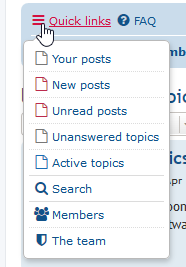
If you're using the Latte theme, it's already built in.
Just below the TromboneChat logo is a Hamburger menu (three small horizontal lines button) - click that and you'll see lots of coolio stuff, and unread topics is in there!
Just below the TromboneChat logo is a Hamburger menu (three small horizontal lines button) - click that and you'll see lots of coolio stuff, and unread topics is in there!
- hyperbolica
- Posts: 3990
- Joined: Mar 23, 2018
I use the Active Topics list, but the menu upper left has unread posts as well.
and then the red page icons indicate the last post I didn't read within that thread.
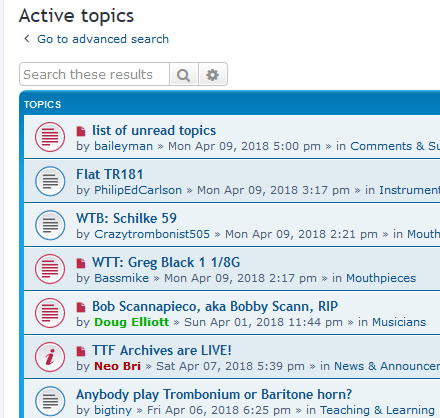
So I can see things I've read and not read.
I think this forum has better options than the TTF.
and then the red page icons indicate the last post I didn't read within that thread.
So I can see things I've read and not read.
I think this forum has better options than the TTF.
- Matt_K
- Posts: 4809
- Joined: Mar 21, 2018
[quote="baileyman"]Cool. Thx. How id yours turn blue?[/quote]
Click on the person shaped icon in your menu, then select user control panel.
<ATTACHMENT filename="user control.png" index="3">[attachment=3]user control.png</ATTACHMENT>
Then select board preferences -> my board style.
<ATTACHMENT filename="change theme.png" index="0">[attachment=0]change theme.png</ATTACHMENT>
The blue one is ProSilver, although the Flat Style Blue is similar. Note that we haven't done anything to these themes yet though we'll be adding the logo hopefully soon to them.
Click on the person shaped icon in your menu, then select user control panel.
<ATTACHMENT filename="user control.png" index="3">
Then select board preferences -> my board style.
<ATTACHMENT filename="change theme.png" index="0">
The blue one is ProSilver, although the Flat Style Blue is similar. Note that we haven't done anything to these themes yet though we'll be adding the logo hopefully soon to them.
- Drizabone
- Posts: 9
- Joined: Mar 23, 2018
Matt,
the unread posts lists is great Mat, thanks.
One extra thing I'd find really useful is if you could take us to the last post we haven't read when we enter a thread. I hope its easy to do.
tia and for your great work
the unread posts lists is great Mat, thanks.
One extra thing I'd find really useful is if you could take us to the last post we haven't read when we enter a thread. I hope its easy to do.
tia and for your great work
- hyperbolica
- Posts: 3990
- Joined: Mar 23, 2018
[quote="Drizabone"]Matt,
the unread posts lists is great Mat, thanks.
One extra thing I'd find really useful is if you could take us to the last post we haven't read when we enter a thread. I hope its easy to do.
tia and for your great work[/quote]
Yeah, that's what the red rectangle (sheet of paper with the corner folded over)is for to the left of each thread. If you hover over it with the mouse, it gives the tooltip "Unread Post". Also, if you look in the upper right of a thread, there is a link for "First Unread Post". There are a lot of helpful links, you just have to find them.
the unread posts lists is great Mat, thanks.
One extra thing I'd find really useful is if you could take us to the last post we haven't read when we enter a thread. I hope its easy to do.
tia and for your great work[/quote]
Yeah, that's what the red rectangle (sheet of paper with the corner folded over)is for to the left of each thread. If you hover over it with the mouse, it gives the tooltip "Unread Post". Also, if you look in the upper right of a thread, there is a link for "First Unread Post". There are a lot of helpful links, you just have to find them.
- Neo_Bri
- Posts: 1342
- Joined: Mar 21, 2018
One other thing is that you can change the default direction of the posts in your User CP. For example, you can have posts going with newest at the top by default.
- Neo_Bri
- Posts: 1342
- Joined: Mar 21, 2018
Oh, and I didn't know about the little piece of paper link. Cool.
- Matt_K
- Posts: 4809
- Joined: Mar 21, 2018
You can also sort posts I'm descending order so the new ones show on top. That's how I view the forum
- baileyman
- Posts: 1169
- Joined: Mar 24, 2018
I'm now looking around for some kind of switch to point me to the last unread comment in a post, else I think as per TTF I will be forever paging down...
- Matt_K
- Posts: 4809
- Joined: Mar 21, 2018
[quote="baileyman"]I'm now looking around for some kind of switch to point me to the last unread comment in a post, else I think as per TTF I will be forever paging down...[/quote]
As far as I am aware, this feature has not been implemented in phpBB. One of the developers commented a few years ago:
However, a workaround could be using the RSS feeds and using an aggregator like feedbin.
There is a way to go to the last post, which is by clicking the arrow next to the 'last post' author. And, as I do, viewing the pages in reverse so that the newest post is on top and the oldest posts on the bottom. That way, even on threads with >50 posts, the content I'm viewing is probably never on page 2 or greater.
As far as I am aware, this feature has not been implemented in phpBB. One of the developers commented a few years ago:
If you select for a time limit "Since my last visit" then you will only see posts since your last visits. phpBB does not track whether you read an individual topic or post. It merely checks your last visit date with the last topic post date and assumes there are posts in that topic you have not read. Smartfeed can filter posts so that only those after your last visit date and time are shown.
However, a workaround could be using the RSS feeds and using an aggregator like feedbin.
There is a way to go to the last post, which is by clicking the arrow next to the 'last post' author. And, as I do, viewing the pages in reverse so that the newest post is on top and the oldest posts on the bottom. That way, even on threads with >50 posts, the content I'm viewing is probably never on page 2 or greater.
- MoominDave
- Posts: 102
- Joined: Mar 24, 2018
TTF had a list which I always started my site sessions with - new replies to threads already posted to - and the links were to the next unread comment in that thread.
Any chance? Or is it here already, and I haven't spotted it?
Any chance? Or is it here already, and I haven't spotted it?
- afugate
- Posts: 671
- Joined: Mar 23, 2018
If I understand what you're asking... This icon works for me.
<ATTACHMENT filename="Screen Shot 2018-04-23 at 5.54.01 AM.png" index="0">[attachment=0]Screen Shot 2018-04-23 at 5.54.01 AM.png</ATTACHMENT>
-- Andy in OK
<ATTACHMENT filename="Screen Shot 2018-04-23 at 5.54.01 AM.png" index="0">
-- Andy in OK
- MoominDave
- Posts: 102
- Joined: Mar 24, 2018
That finds you the first unread post in that thread, ta. What I'm looking for is a list of threads that I've previously posted to (I've seen this labelled as "subscribed threads" on other forums) that have new posts. Was it only me that used that on TTF (surely not...)?
- mrpillow
- Posts: 89
- Joined: Mar 23, 2018
If you click the three bar icon tab you can click on "your topics" and it will show them in order of most recent postings. Doesn't show strictly ones with new posts but does include them.
- Neo_Bri
- Posts: 1342
- Joined: Mar 21, 2018
[quote="mrpillow"]If you click the three bar icon tab you can click on "your topics" and it will show them in order of most recent postings. Doesn't show strictly ones with new posts but does include them.[/quote]
Exactly. That three-bar tiny tab immediately below the TromboneChat logo is called a "hamburger menu" cause it looks like a little burger. Click that for lots of options.
Exactly. That three-bar tiny tab immediately below the TromboneChat logo is called a "hamburger menu" cause it looks like a little burger. Click that for lots of options.
- Matt_K
- Posts: 4809
- Joined: Mar 21, 2018
You can also navigate straight to: <LINK_TEXT text="http://trombonechat.com/search.php?sear ... nreadposts">http://trombonechat.com/search.php?search_id=unreadposts</LINK_TEXT> or make that URL a bookmark. That's generally what I've been doing.
- MoominDave
- Posts: 102
- Joined: Mar 24, 2018
Yes, that’s it. Thanks!
- BGuttman
- Posts: 7368
- Joined: Mar 22, 2018
Note that in other skins, the "hamburger" has the term "Quick Links" next to it.
Active Topics seems to go back a week for any posts.
New Posts seems to go back to your last visit.
Unread Posts works like New Posts, but limits you to unread posts (listed by topic).
Active Topics seems to go back a week for any posts.
New Posts seems to go back to your last visit.
Unread Posts works like New Posts, but limits you to unread posts (listed by topic).
- BeJimmiecalge
- Posts: 3
- Joined: Aug 20, 2019
Thats what I use to find new posts on the site, too, Botond. Top of the site: "New Posts."
Additionally, the blue read and red unread ZHP Mafia icons also alert me to whether I have unread topics.
Additionally, the blue read and red unread ZHP Mafia icons also alert me to whether I have unread topics.